Best RGB Standing Desk for a Gaming Battlestation

Six RGB standing desks compared on lift range, load rating, warranty and lighting depth, with the winner named and the flips that change it.

By Jadiel FranklinUpdated 15 min read
On this page
- Best RGB standing desk at a glance
- How I screened this shortlist
- 1. Flycity 55" x 24" Electric Gaming Standing Desk — Best overall
- 2. FLEXISPOT E6G CyberX 55" RGB LED — Best premium
- 3. VIVO Black 71 x 30 in Standing Desk — Best for heavy use
- 4. HLDIRECT 47" Electric Gaming Standing Desk — Best budget pick
- 5. GTPLAYER Electric Standing Desk — Best for families
- 6. GTPLAYER RGB Electric Standing Desk — Best lightweight
- What actually decides an RGB standing desk
- How bright and how programmable is the lighting, really?
- Does the frame hold a triple-monitor setup?
- What the listings do not tell you about the RGB
- The verdict
- FAQ
The best RGB standing desk for most gaming setups is the Flycity 55" x 24" Electric Gaming Standing Desk, thanks to a 28.3" to 47.2" lift range, a carbon-fiber top and a lighting system Flycity lists at 7 RGB colors, 210 dynamic modes and 255 voice-activated modes. If you want a wider frame with a stronger motor and a published warranty, the FLEXISPOT E6G CyberX 55" is the better buy. Get the wrong one and you will end up with a wobbly 44-inch board that lights up nicely and shakes every time you type.
Best RGB standing desk at a glance
| Pick | Size | Lift range | Price |
|---|---|---|---|
Best overall Flycity 55" Gaming Standing Desk |
55" x 24" | 28.3"–47.2" | Check Price |
Best premium FLEXISPOT E6G CyberX 55" |
55" x 28" | 24.4"–50" claim | Check Price |
Best for heavy use VIVO 71 x 30 in Standing Desk |
71" x 30" | 29.4"–48.6" | Check Price |
Best budget pick HLDIRECT 47" Gaming Desk |
47" x 23.7" | not listed | Check Price |
Best for families GTPLAYER Electric Standing Desk |
44" x 24" | 28.34"–45.28" claim | Check Price |
Best lightweight GTPLAYER RGB Electric Desk |
44" x 24" | not listed | Check Price |


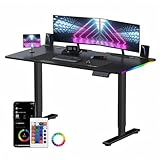
How I screened this shortlist
I started with a wider pool of electric standing desks that advertise RGB and cut anything that could not verify three things from its own listing: an electric lift with a stated height range, an integrated RGB system on the desk itself (not a suggestion to buy strips later), and a stated top size. That left the six above.
I then lined up the specifications side by side. Where a brand states a lift range, load rating or warranty, I used the figure. Where the listing is quiet, I said so. Two of the six do not publish a lift range at all, which is the single biggest weakness in the category.
A note on the keyword. "RGB standing desk" is a real buyer intent, but Amazon returns a fair number of results where the RGB is a mouse pad rather than an edge strip. VIVO's pick is the clearest example: it is an RGB desk pad, not a lit frame. I have kept it because that is a genuine version of the category, but you should know which flavour you want before you click.
In practice, three questions decide the buy:
- How wide a top do you need?
- How much weight will the frame carry?
- Is the RGB on the surface or around the frame?
1. Flycity 55" x 24" Electric Gaming Standing Desk — Best overall
The Flycity 55" gets the nod because it hits the middle of every axis that matters: size, lift range and lighting depth.
Best for: a mid-size battlestation that wants deep lighting control Skip it if: you need a wide surface for triple monitors
The 55" x 24" top is wider than the three 44-inch picks in this set without going to the 71-inch VIVO's footprint, and the 28.3" to 47.2" lift range suits sitting, standing and streaming positions. The tabletop is carbon fibre finish over CARB-certified panels, which is Flycity's claim, and the frame uses cold-rolled steel. What earns the top slot is the lighting: Flycity lists 7 RGB colors, 210 dynamic modes and 255 voice-activated modes, which is the deepest programmable setup of any pick here.
It sits at the second-highest price position after the Flexispot, so you are paying for the lighting range and the host shelf, not for a wider desk or a stronger motor. Sales-wise it is mid-pack for the set. The trade-off against the Flexispot is a shorter lift range and no published warranty; the trade-off against the VIVO is roughly half the surface area.
Pros:
- 7 colors and 210 modes give real programmability
- 28.3"–47.2" lift covers seated, standing and streaming
- Cable-management shelf on the underdesk
- Carbon-fibre surface reduces arm friction
- Sits mid-set on price for the deepest lighting
Cons:
- No published warranty in the listing
- Load rating is not stated
- 24-inch depth is tight for triple monitors
2. FLEXISPOT E6G CyberX 55" RGB LED — Best premium
The Flexispot E6G is what you buy when the warranty and the load rating are the numbers you care about.

Best for: heavy rigs where warranty and lift capacity matter Skip it if: you want the cheapest way into RGB
Flexispot lists three-sided RGB LED strips integrated into the desk, a gamepad-style joystick controller, dual motors and a 24.4" to 50" three-stage lift range. The load rating in the listing is 352 lbs, the highest here. The warranty coverage is the strongest in the set: Flexispot says 5 years on frame and motors, 3 years on electronics and the controller. That is a lot of paper protection for a category where most brands publish nothing.
This is the most expensive pick here and it sells the fastest of the six, so the case for it is not niche. The 55" x 28" top is deeper than the Flycity's 24", which matters if you run a curved 34-inch monitor plus a stream deck. Where it loses to the Flycity is in stated lighting granularity: three-sided strips with a joystick versus a 210-mode preset library.
Pros:
- 24.4"–50" three-stage lift range (claim)
- 352-lb capacity claim, the highest in this set
- 5-year frame and motor coverage (claim)
- Three-sided RGB strips wrap the frame
- Sells fastest of the six here
Cons:
- The most expensive pick in the set
- Fewer stated lighting modes than the Flycity
- Weight of the assembled desk is not published
3. VIVO Black 71 x 30 in Standing Desk — Best for heavy use
The VIVO is the odd one out: the RGB is a full-desktop mouse pad, not a frame strip, and the top is enormous.

Best for: long shifts with a full-desk RGB mouse pad Skip it if: you want lighting on the desk edges, not the surface
At 70.9" x 29.5", this is the largest surface in the set by a wide margin. The frame is all-steel with a stated 220-lb load rating and a 29.4" to 48.6" motorised lift range. VIVO publishes a 3-year warranty, which is rare in this shortlist. The RGB comes from a full-size desk pad spanning the entire top with a rubber base, so the lit surface is under your keyboard and mouse rather than around the frame.
Weight is 57 lb, the heaviest here, which tells you the frame is solid. It is the second-most-expensive pick and it sells faster than most of the set. The trade-off is honest: if you wanted glowing edges around a gaming desk, this is not that. If you wanted a wide, sturdy work surface with a lit deskpad thrown in, it is easily the best pick here.
Pros:
- 70.9" x 29.5" top, the largest in this set
- 220-lb load rating with all-steel frame
- 29.4"–48.6" lift range with electric motor
- Published 3-year warranty
- Full-surface RGB pad rather than a small mat
Cons:
- Lighting is on the pad, not the frame
- 57 lb makes solo assembly harder
- Premium price for a deskpad-based RGB solution
4. HLDIRECT 47" Electric Gaming Standing Desk — Best budget pick
HLDIRECT is the cheapest of the six and the sensible way in if this is your first RGB desk.

Best for: a first RGB desk in a small room Skip it if: you need memory presets you can trust for years
The HLDIRECT desk runs 47" wide by 23.7" deep, weighs 45 lb and carries HLDIRECT's own claims of built-in RGB LED atmosphere lights with adjustable modes and brightness, a silent motor and 3 height memory presets. The listing does not publish a lift range or a load rating, which is the biggest limitation of picking on price alone in this category.
It is the cheapest pick here by a clear margin, which is why it earns the budget slot despite the missing figures. The 47" width is a real Goldilocks size for a bedroom or a dorm, sitting between the 44-inch GTPLAYER pair and the 55-inch Flycity. Compared to the Flycity, you lose the deeper lighting programme, the wider top and any published warranty. Compared to the GTPLAYER, you gain a slightly wider surface and lose the stated lift range.
Pros:
- Cheapest pick in the set
- 47" width fits small rooms without going to 44"
- 3 stated height memory presets
- HLDIRECT claims a silent motor
- Rounded corners for safer edges
Cons:
- Lift range is not published
- Load rating is not published
- No stated warranty
5. GTPLAYER Electric Standing Desk — Best for families
The GTPLAYER GTZ2102603 is a compact, programmable desk that suits a shared workstation.

Best for: a shared desk with programmable height presets Skip it if: you want a wide surface or a published warranty
At 44" wide by 24" deep and 43.2 lb, this GTPLAYER is compact by the standards of this shortlist. GTPLAYER claims a 28.34" to 45.28" lift range, programmable height settings, dual cable-management storage and a mouse pad in the box. RGB is on the desk itself, described in the listing as vibrant and dynamic. There is no published warranty and no load rating.
Where this earns its place is in the height-preset story. In a house where a partner or a teenager also uses the desk, one-button switching between two saved heights removes the daily nuisance. It is the second-cheapest of the six and roughly on the same footprint as the lightweight GTPLAYER below. The trade-off against the Flycity is size and lighting depth; the trade-off against the HLDIRECT is a marginally higher price for a stated lift range.
Pros:
- Programmable height presets for shared use
- 28.34"–45.28" stated lift range (claim)
- Second-cheapest pick in the set
- Dual cable-management storage
- Mouse pad included
Cons:
- 44" width is tight for a full battlestation
- No published warranty
- Load rating is not stated
6. GTPLAYER RGB Electric Standing Desk — Best lightweight
This GTZ210 shares the 44-inch footprint with its sibling and is the pick for renters who move often.
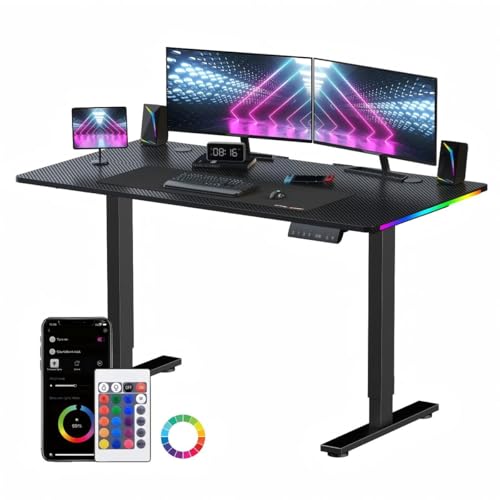
Best for: renters who move often and need a compact desk Skip it if: you plan to load it with heavy gear
Dimensions are 44" x 24" x 28.3" and the weight is 43.2 lb, tied with the other GTPLAYER for the second-lightest here (only the HLDIRECT is lighter at 45 lb, though it is slightly wider). RGB is on the desk, GTPLAYER claims dynamic lighting, and the mouse pad is included. The listing has two sellers rather than one, which is a small note in its favour on the resupply side.
This is the third-cheapest pick and it sits mid-set on price. The lift range is not stated on this listing, which is the reason it lands below its sibling in the ranking despite an almost identical spec sheet. The honest trade-off: you are choosing between the GTZ2102603 with a stated lift range and no second seller, and this one with a second seller and no stated lift range. If you value the figure, buy the other. If you value having a fallback seller, buy this.
Pros:
- 43.2 lb makes moving between rooms easier
- Compact 44" x 24" footprint
- Two sellers listed for the same product
- Includes a mouse pad
- Mid-set on price for RGB and electric lift
Cons:
- Lift range is not published on this listing
- No stated warranty or load rating
- Overlaps heavily with the other GTPLAYER pick
What actually decides an RGB standing desk
Most guides in this category compare colour modes. That is not what decides it. Colour modes are cheap; a bad frame is not. What decides an RGB standing desk is the pairing of top size to lift mechanism, because a shaky desk with beautiful lights is worse than a plain desk that sits still.
Here is the trick. When you compare specifications, weight the ones the manufacturer stakes its warranty on. Flexispot lists 352-lb capacity and puts 5 years behind its frame; VIVO lists 220 lb and puts 3 years behind its frame. Flycity claims a rigid steel construction but publishes no warranty and no load figure, so its lighting story is doing the selling. That is not automatically a red flag, but it tells you where to point the reader's scepticism.
A short taxonomy of what buyers overpay for in the best rgb standing desk category:
- Colour count above 7. You cannot distinguish 16 million from 7 in a dim room.
- Voice-activated modes. Fun on day one, ignored by month two.
- Curved corners marketed as ergonomic. They are safety corners, not ergonomic ones.
And what buyers underpay attention to:
- The stated lift range, in inches, from and to.
- The load rating, in pounds, for the fully extended position.
- The warranty length, in years, on the motor specifically.
How bright and how programmable is the lighting, really?
The listings vary a lot in what they publish about the RGB itself, and this is where the best rgb standing desk decision gets fuzzy. Flycity is the most specific: 7 RGB colors, 210 dynamic modes and 255 voice-activated modes. Flexispot describes three-sided LED strips and a joystick controller with multi-colour lighting but does not publish a mode count. HLDIRECT says its lighting has adjustable modes and brightness, without a figure. The two GTPLAYER desks describe "dynamic" and "vibrant" lighting without a count.
What this means in practice. If you want a specific lighting programme you can dial in, only the Flycity gives you a numbered library to work from. If you want lighting integrated around the whole frame, the Flexispot's three-sided strips are the clearest fit in this shortlist. If you want the lit surface under your hands, the VIVO's full-desktop pad is the only pick that delivers that.
None of these desks publish a lumen figure or a colour-temperature range, so brightness comparisons are impossible from the data alone. A best rgb standing desk shopper should treat every glow-in-the-photo image as a marketing shot, not a measurement.
Does the frame hold a triple-monitor setup?
Only two picks state a load rating: the VIVO at 220 lb and the Flexispot at 352 lb. Everything else is silent on this. That silence is the answer for anyone planning a triple-monitor rig with a stream mic, a laptop clamp and a ring light.
A rough working number for a triple-monitor gaming setup: 30 to 45 lb of monitors and mounts, 5 to 10 lb of PC peripherals on the desk (mic, keyboard, mouse, controller, deskpad), and 10 to 20 lb of everything else (headphones, laptop, snacks, water bottle). That is comfortably inside the VIVO's 220-lb figure and well inside the Flexispot's 352-lb figure. It is a question mark on the other four, because the manufacturer has not answered it.
The best rgb standing desk for a heavy setup here is the Flexispot, on the load rating alone. The VIVO is the better answer if you want the biggest surface and can accept lighting on the pad instead of the frame.
What the listings do not tell you about the RGB
Three things every product page in this shortlist leaves out:
- Where the controller lives. Flexispot mentions a joystick controller. The others do not describe where you change modes: on the desk, on a wired remote, or via an app. That matters if the controller lives on a cable you will trip over.
- How the RGB is powered. None of the six lists whether the lighting draws from the same mains cable as the motor or from a separate transformer. If it is separate, you need a second outlet.
- Whether the lighting turns off independently of the motor. For anyone who wants to stand up and work in a quiet, unlit room, this is a real ergonomic question, not a cosmetic one.
None of that is a reason to avoid the category. It is a reason to open the box first, before you route cables into a wall channel you cannot easily reverse. Skip this one if you are the sort of buyer who wants a specification for every feature: RGB standing desks in this price range publish less than office desks do.
The verdict
Three price positions, three verdicts.
At the entry price positions, the HLDIRECT is the pick. It gives you an electric-lift RGB desk with 3 memory presets in a 47-inch footprint, and the missing lift-range figure is the price of admission at this tier. The GTPLAYER GTZ2102603 is the alternative if you can spend a little more for a stated lift range.
At the mid price positions, the Flycity 55" is the winner and the winner of the shortlist. The 28.3" to 47.2" lift, the 55-inch top and Flycity's 7 colors and 210 modes give you a real battlestation without moving into premium territory. The lightweight GTPLAYER at the same tier is the pick only if a second seller matters more than a stated lift range.
At the premium price positions, the Flexispot E6G is the answer for anyone loading a triple-monitor setup, with the 352-lb capacity claim and the 5-year frame warranty leading the case. The VIVO is the alternative if you want the largest surface and prefer lighting on the deskpad. The cutoff is your load in pounds: under 200, take the Flycity; over 200, take the Flexispot.
FAQ
Is an RGB standing desk worth it over a plain electric one?
An RGB standing desk is worth the extra outlay if you already use RGB peripherals and want the frame to match your keyboard, mouse and case. If you use the desk mainly for spreadsheets and video calls, a plain electric standing desk saves money and gives you the same lift mechanism. The lighting is cosmetic, not ergonomic.
What is the best RGB standing desk for a triple-monitor setup?
The best RGB standing desk for a triple-monitor setup in this shortlist is the FLEXISPOT E6G CyberX 55", because it is the only pick with a stated load rating above 300 lb, listed by Flexispot at 352 lb, and it publishes a 24.4" to 50" lift range across three-stage legs. The VIVO 71 x 30 is the wider alternative at a stated 220-lb capacity.
How does the Flycity compare to the Flexispot E6G head-to-head?
Flycity versus Flexispot comes down to lighting depth against frame strength. The Flycity publishes 7 colors, 210 dynamic modes and 255 voice-activated modes, which is the deepest lighting programme here. The Flexispot publishes a 352-lb capacity, a 24.4"–50" three-stage lift and 5-year frame coverage. Pick Flycity for the lighting control; pick Flexispot for the heavy rig.
Do these desks include a mouse pad or lighting controller in the box?
Both GTPLAYER desks and the VIVO include a mouse pad in the listing description. The Flexispot lists a gamepad-style joystick controller in the box. The Flycity, the HLDIRECT and the two GTPLAYERs do not describe where their lighting controller lives, which is worth checking before you plan cable routes. None of the listings mention a mobile app.
What size RGB standing desk should I buy for a small room?
For a small room, the 44-inch GTPLAYER pair fits a corner cleanly at 44" x 24", and the 47" HLDIRECT sits close to that footprint at 47" x 23.7". Anything at 55" or 71" starts to dominate a bedroom. Measure the wall first, add 4 inches for cable clearance behind, then pick the largest top that leaves a walkway.
The right next step is to measure the wall you plan to put the desk against, note the depth you need for your monitor arm, and compare that against the six footprints in the table. If you land inside the Flycity's 55" x 24" and you like the idea of programmable lighting modes rather than lit edges, that is your desk. The real reason it wins the shortlist is not the mode count, it is the balance: a surface wide enough for a real gaming rig, a lift range that fits sitting and standing shifts, and a lighting story with published figures behind it. Very few desks in this category can claim all three.